---
title: Integrate with Peakflo API - Developer’s Guide
description: We’ll provide an overview of the Peakflo API, highlighting its key functionalities and demonstrating how you can seamlessly integrate Peakflo with your existing software.
---
[Skip to content](https://help.peakflo.co/integrate-with-peakflo-api-developers-guide#main-content)
[](https://peakflo.co/)
- [Go to Customer Portal](https://help.peakflo.co/tickets-view)
- [Go to peakflo.co](https://peakflo.co/)
Open main navigation
Close main navigation
- [Go to Customer Portal](https://help.peakflo.co/tickets-view)
- [Go to peakflo.co](https://peakflo.co/)
Hello! How can we help you?
- There are no suggestions because the search field is empty.
1. [Help Center](https://help.peakflo.co/?hsLang=en)
2. [Integrations Page](https://help.peakflo.co/integrations-page?hsLang=en)
3. [Peakflo API](https://help.peakflo.co/integrations-page?hsLang=en#peakflo-api)
# Integrate with Peakflo API - Developer’s Guide
## We’ll provide an overview of the Peakflo API, highlighting its key functionalities and demonstrating how you can seamlessly integrate Peakflo with your existing software systems for enhanced efficiency and automation.
**Table of Content**
[What is the Peakflo API?](https://help.peakflo.co/integrate-with-peakflo-api-developers-guide#intro)
[Getting Started with the Peakflo API](https://help.peakflo.co/integrate-with-peakflo-api-developers-guide#step)
[Important Information](https://help.peakflo.co/integrate-with-peakflo-api-developers-guide#info)
[Data Flow Diagram](https://help.peakflo.co/integrate-with-peakflo-api-developers-guide#diagram)
[Explore the Peakflo Developer Guide](https://help.peakflo.co/integrate-with-peakflo-api-developers-guide#developer-guide)
---
#### **What is the Peakflo API?**
The Peakflo API is a powerful tool designed to help you manage your customer, vendor, invoice, PO, payments, and other data related to your accounts receivable and payable functions.
The Peakflo API is designed to be RESTful, featuring user-friendly, resource-oriented URLs and JSON-encoded responses. We use standard HTTP response codes to ensure a smooth and predictable experience for developers.
---
#### **Getting Started with the Peakflo API**
To start using the Peakflo API, follow these simple steps:
**1. Create Your Account:** Sign up for an account on Peakflo.
**2. Set Up Credentials:** Set up the Private key and Access token in the Peakflo settings.
💡 **Note:**
You can ask the Peakflo team or email us at [support@peakflo.co](mailto:support@peakflo.co) to get the Private key and Access token. Peakflo will provide the Private Key and Access Token to your email ID.
**3. Generate JWT Tokens:** Use your Private Key to generate JWT tokens for authentication.
**4. Integration:** Integrate the API with your existing systems using the [Peakflo Developers Guide](https://peakflo-public-api.stoplight.io/docs/peakflo-public-api/72b66de24898e-getting-started).
**5. Testing:** Test the integration to ensure everything works smoothly.
---
#### **Important Information**
- **Date Format:** All dates in the Peakflo API are in UTC and follow the ISO 8601 format (e.g., 2021-03-24T18:06:03Z).
- **Currency Format:** We use ISO 4217 for currency codes (e.g., USD, SGD, INR).
- **API Rate Limits:** To maintain service health and fairness, API requests are limited to 100 requests per second per account.
---
#### Data Flow Diagram
#### **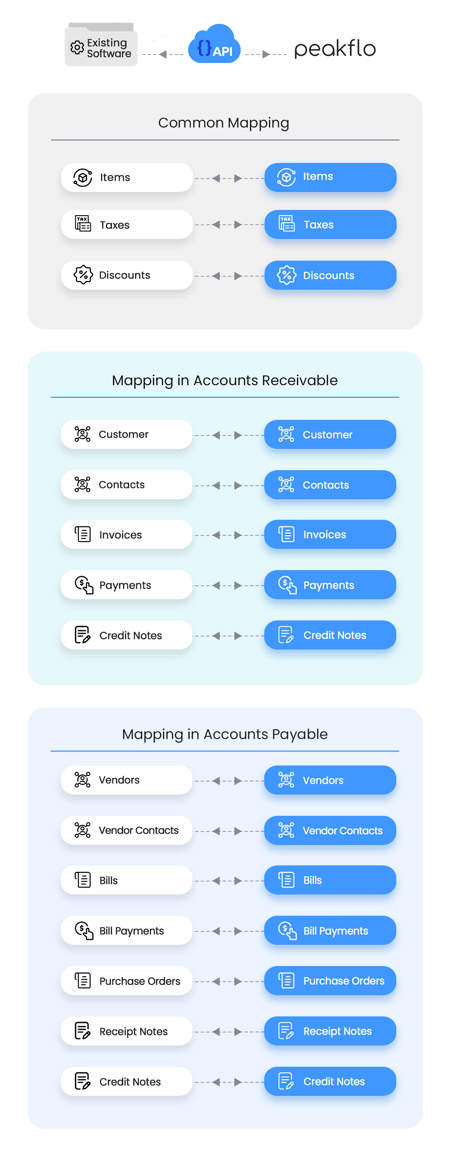**
---
#### **Explore the Peakflo Developer Guide**
For detailed technical documentation, including API endpoints, request formats, and usage examples, please visit our [Peakflo Developer Guide](https://peakflo-public-api.stoplight.io/docs/peakflo-public-api/72b66de24898e-getting-started). The portal is your go-to resource for all things related to the Peakflo API.
If you have any questions or need further assistance, our support team is always here to help. Reach out at [support@peakflo.co](mailto:support@peakflo.co)
- [New to Peakflo?](https://help.peakflo.co/new-to-peakflo?hsLang=en)
- [Accounts Payable](https://help.peakflo.co/accounts-payable?hsLang=en#main-content)
- [Getting Started](https://help.peakflo.co/accounts-payable?hsLang=en#getting-started)
- [Rules](https://help.peakflo.co/accounts-payable?hsLang=en#rules)
- [Approval Workflow](https://help.peakflo.co/accounts-payable?hsLang=en#approval-workflow)
- [Custom Fields](https://help.peakflo.co/accounts-payable?hsLang=en#custom-fields)
- [Vendors](https://help.peakflo.co/accounts-payable?hsLang=en#vendors)
- [Purchase Requests](https://help.peakflo.co/accounts-payable?hsLang=en#purchase-requests)
- [Purchase Quotes](https://help.peakflo.co/accounts-payable?hsLang=en#purchase-quotes)
- [Purchase Orders](https://help.peakflo.co/accounts-payable?hsLang=en#purchase-orders)
- [OCR](https://help.peakflo.co/accounts-payable?hsLang=en#ocr)
- [Bill Management](https://help.peakflo.co/accounts-payable?hsLang=en#bill-management)
- [My Approvals](https://help.peakflo.co/accounts-payable?hsLang=en#my-approvals)
- [Goods Receipt Notes & Service Receipt Notess](https://help.peakflo.co/accounts-payable?hsLang=en#goods-receipt-notes-service-receipt-notess)
- [Budget](https://help.peakflo.co/accounts-payable?hsLang=en#budget)
- [Reconciliation](https://help.peakflo.co/accounts-payable?hsLang=en#reconciliation)
- [Reports](https://help.peakflo.co/accounts-payable?hsLang=en#reports)
- [Wallet & Transactions](https://help.peakflo.co/accounts-payable?hsLang=en#wallet-transactions)
- [Payments](https://help.peakflo.co/accounts-payable?hsLang=en#payments)
- [Vendor Onboarding Management](https://help.peakflo.co/accounts-payable?hsLang=en#vendor-onboarding-management)
- [Vendor Portal](https://help.peakflo.co/accounts-payable?hsLang=en#vendor-portal)
- [WhatsApp Vendor Portal](https://help.peakflo.co/accounts-payable?hsLang=en#whatsapp-vendor-portal)
- [Three-way Matching](https://help.peakflo.co/accounts-payable?hsLang=en#three-way-matching)
- [Accounts Receivable](https://help.peakflo.co/accounts-receivable?hsLang=en#main-content)
- [Getting Started](https://help.peakflo.co/accounts-receivable?hsLang=en#getting-started)
- [Invoice Management](https://help.peakflo.co/accounts-receivable?hsLang=en#invoice-management)
- [Workflow Management](https://help.peakflo.co/accounts-receivable?hsLang=en#workflow-management)
- [Actions](https://help.peakflo.co/accounts-receivable?hsLang=en#actions)
- [Customer Management](https://help.peakflo.co/accounts-receivable?hsLang=en#customer-management)
- [Customer Portal](https://help.peakflo.co/accounts-receivable?hsLang=en#customer-portal)
- [Collections](https://help.peakflo.co/accounts-receivable?hsLang=en#collections)
- [Reports](https://help.peakflo.co/accounts-receivable?hsLang=en#reports)
- [Credit Notes](https://help.peakflo.co/accounts-receivable?hsLang=en#credit-notes)
- [Integrations Page](https://help.peakflo.co/integrations-page?hsLang=en#main-content)
- [Basics](https://help.peakflo.co/integrations-page?hsLang=en#basics)
- [Peakflo API](https://help.peakflo.co/integrations-page?hsLang=en#peakflo-api)
- [Xero](https://help.peakflo.co/integrations-page?hsLang=en#xero)
- [NetSuite](https://help.peakflo.co/integrations-page?hsLang=en#netsuite)
- [Jurnal](https://help.peakflo.co/integrations-page?hsLang=en#jurnal)
- [Quickbooks](https://help.peakflo.co/integrations-page?hsLang=en#quickbooks)
- [Microsoft Dynamics 365 Business Central](https://help.peakflo.co/integrations-page?hsLang=en#microsoft-dynamics-365-business-central)
- [Microsoft Dynamics 365 Finance & Operations](https://help.peakflo.co/integrations-page?hsLang=en#microsoft-dynamics-365-finance-operations)
- [Zalo](https://help.peakflo.co/integrations-page?hsLang=en#zalo)
- [SFTP](https://help.peakflo.co/integrations-page?hsLang=en#sftp)
- [SAP](https://help.peakflo.co/integrations-page?hsLang=en#sap)
- [Travel & Expense Management](https://help.peakflo.co/travel-expense-management?hsLang=en)
- [Payment Automation](https://help.peakflo.co/payment-automation?hsLang=en)
- [Reports](https://help.peakflo.co/reports?hsLang=en)
- [Legal Notes](https://help.peakflo.co/legal-notes?hsLang=en)
- [General Questions](https://help.peakflo.co/general-questions?hsLang=en)
- [Guides for Partners](https://help.peakflo.co/guides-for-partners?hsLang=en)
- [Latest Releases](https://help.peakflo.co/latest-releases?hsLang=en)
- [Offboarding](https://help.peakflo.co/offboarding?hsLang=en)
- [Peakflo Ticket Portal](https://help.peakflo.co/peakflo-ticket-portal?hsLang=en)
- [Peakflo 20X](https://help.peakflo.co/peakflo-20x?hsLang=en)
[](http://peakflo.co)
peakflo.co Help Center
Copyright © 2026, Peakflo