---
title: What is an action and what are the different types?
description: When we talk about different actions, we're talking about what we want to happen between you and the customer or what kind of communication you want to have with the customer. Actions can either be ma
---
[Skip to content](https://help.peakflo.co/what-is-an-action-and-what-are-the-different-types#main-content)
[](https://peakflo.co/)
- [Go to Customer Portal](https://help.peakflo.co/tickets-view)
- [Go to peakflo.co](https://peakflo.co/)
Open main navigation
Close main navigation
- [Go to Customer Portal](https://help.peakflo.co/tickets-view)
- [Go to peakflo.co](https://peakflo.co/)
Hello! How can we help you?
- There are no suggestions because the search field is empty.
1. [Help Center](https://help.peakflo.co/?hsLang=en)
2. [Accounts Receivable](https://help.peakflo.co/accounts-receivable?hsLang=en)
3. [Actions](https://help.peakflo.co/accounts-receivable?hsLang=en#actions)
# What is an action and what are the different types?
When we talk about different actions, we're talking about what we want to happen between you and the customer or **what kind of communication you want to have with the customer.**
Actions can either be manual or automatic. Manual means the system will send a reminder to the owner of the account to perform the action. Automatic means that the system will complete the action for you.
If you want to know where to find action, give this [article](https://help.peakflo.co/how-can-i-add-a-new-action-in-the-workflow?hsLang=en) a read.
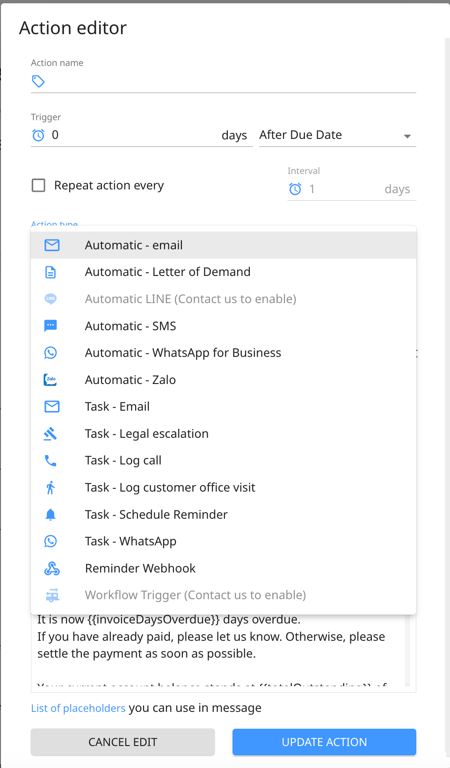
***Here are twelve types of actions:***
- **Automatic Email —** This is an email that is sent out automatically as part of a workflow you've set up. It is sent when conditions, or triggers, are met and handled by the system.
- **Manual Email —** This creates an action in the [account manager's "Task" tab](https://help.peakflo.co/_hcms/analytics/search/conversion?redirect=aHR0cHM6Ly9oZWxwLnBlYWtmbG8uY28vaG93LXRvLWNyZWF0ZS10YXNrcw%3D%3D&ct=SEARCH&pid=14570877&cid=92742507028&t=dGFzaw%3D%3D&d=help.peakflo.co&c=5&rp=1&ab=true&opcid=&rs=UNKNOWN&hs-expires=1761120055&hs-version=1&hs-signature=APUk-v5fICnexp8Bm9FORXW-UJVwvcCnlQ&hsLang=en) that notifies them that an email should be sent. This way, the account manager can customize it before sending it to the customer.
- **Manual WhatsApp** **—** This creates a WhatsApp script that is sent to an account manager's "Task" tab first. This way, the account manager can customize it before sending it from their personal WhatsApp.
- **Automatic WhatsApp for Business —** This action will send the message template you’ve created to the customers via WhatsApp for Business. Please contact [support](mailto:support@peakflo.co) to enable this option.
- **Automatic SMS** **—** This is an SMS text message that is sent automatically as part of a workflow. It is sent when conditions, or triggers, are met and handled by the system.
- **Manual Legal Escalation —** This creates a task in the account manager's "Task" tab to send an email to the internal legal team.
- **Manual Log Customer Office Visit —** This option creates a task in the account manager's "Task" tab urging them to visit the customer's office in person and then log the visit manually afterward.
- **Manual Log Call —** This option creates a task to the account manager's "Task" tab, urging them to call the payer and log the call manually afterward.
- **Automatic Letter of Demand —** This is a paper letter sent by Peakflo on behalf of the customer as a precursor to legal action using the template defined in the workflow action editor.
- **Automatic Zalo —** This action will send the message template you’ve created to the customers via Zalo. Please contact [support](mailto:support@peakflo.co) to enable this option.
- **Automatic Schedule Reminder —** This is an action that will set reminders to perform a certain task according to the schedule you’ve set up.
- **Automatic LINE —** This action will send the message template you’ve created to the customers via LINE.
- **Reminder Webhook — **This action enables you to automate external notifications by using a webhook.
- **Workflow Trigger — **Trigger external workflows directly from AR Tasks using this action type, which offers customizable parameters.
**At what time do the reminders in the workflow get triggered?**
The reminders will be triggered from 8 AM to 9 PM SGT every 30 minutes on business days.
In case you wish to set a specific time of day for the reminders to be triggered, please send a request to support@peakflo.co.
[Back to the Help Portal](https://help.peakflo.co/?hsLang=en)
- [New to Peakflo?](https://help.peakflo.co/new-to-peakflo?hsLang=en)
- [Accounts Payable](https://help.peakflo.co/accounts-payable?hsLang=en#main-content)
- [Getting Started](https://help.peakflo.co/accounts-payable?hsLang=en#getting-started)
- [Rules](https://help.peakflo.co/accounts-payable?hsLang=en#rules)
- [Approval Workflow](https://help.peakflo.co/accounts-payable?hsLang=en#approval-workflow)
- [Custom Fields](https://help.peakflo.co/accounts-payable?hsLang=en#custom-fields)
- [Vendors](https://help.peakflo.co/accounts-payable?hsLang=en#vendors)
- [Purchase Requests](https://help.peakflo.co/accounts-payable?hsLang=en#purchase-requests)
- [Purchase Quotes](https://help.peakflo.co/accounts-payable?hsLang=en#purchase-quotes)
- [Purchase Orders](https://help.peakflo.co/accounts-payable?hsLang=en#purchase-orders)
- [OCR](https://help.peakflo.co/accounts-payable?hsLang=en#ocr)
- [Bill Management](https://help.peakflo.co/accounts-payable?hsLang=en#bill-management)
- [My Approvals](https://help.peakflo.co/accounts-payable?hsLang=en#my-approvals)
- [Goods Receipt Notes & Service Receipt Notess](https://help.peakflo.co/accounts-payable?hsLang=en#goods-receipt-notes-service-receipt-notess)
- [Budget](https://help.peakflo.co/accounts-payable?hsLang=en#budget)
- [Reconciliation](https://help.peakflo.co/accounts-payable?hsLang=en#reconciliation)
- [Reports](https://help.peakflo.co/accounts-payable?hsLang=en#reports)
- [Wallet & Transactions](https://help.peakflo.co/accounts-payable?hsLang=en#wallet-transactions)
- [Payments](https://help.peakflo.co/accounts-payable?hsLang=en#payments)
- [Vendor Onboarding Management](https://help.peakflo.co/accounts-payable?hsLang=en#vendor-onboarding-management)
- [Vendor Portal](https://help.peakflo.co/accounts-payable?hsLang=en#vendor-portal)
- [WhatsApp Vendor Portal](https://help.peakflo.co/accounts-payable?hsLang=en#whatsapp-vendor-portal)
- [Three-way Matching](https://help.peakflo.co/accounts-payable?hsLang=en#three-way-matching)
- [Accounts Receivable](https://help.peakflo.co/accounts-receivable?hsLang=en#main-content)
- [Getting Started](https://help.peakflo.co/accounts-receivable?hsLang=en#getting-started)
- [Invoice Management](https://help.peakflo.co/accounts-receivable?hsLang=en#invoice-management)
- [Workflow Management](https://help.peakflo.co/accounts-receivable?hsLang=en#workflow-management)
- [Actions](https://help.peakflo.co/accounts-receivable?hsLang=en#actions)
- [Customer Management](https://help.peakflo.co/accounts-receivable?hsLang=en#customer-management)
- [Customer Portal](https://help.peakflo.co/accounts-receivable?hsLang=en#customer-portal)
- [Collections](https://help.peakflo.co/accounts-receivable?hsLang=en#collections)
- [Reports](https://help.peakflo.co/accounts-receivable?hsLang=en#reports)
- [Credit Notes](https://help.peakflo.co/accounts-receivable?hsLang=en#credit-notes)
- [Integrations Page](https://help.peakflo.co/integrations-page?hsLang=en#main-content)
- [Basics](https://help.peakflo.co/integrations-page?hsLang=en#basics)
- [Peakflo API](https://help.peakflo.co/integrations-page?hsLang=en#peakflo-api)
- [Xero](https://help.peakflo.co/integrations-page?hsLang=en#xero)
- [NetSuite](https://help.peakflo.co/integrations-page?hsLang=en#netsuite)
- [Jurnal](https://help.peakflo.co/integrations-page?hsLang=en#jurnal)
- [Quickbooks](https://help.peakflo.co/integrations-page?hsLang=en#quickbooks)
- [Microsoft Dynamics 365 Business Central](https://help.peakflo.co/integrations-page?hsLang=en#microsoft-dynamics-365-business-central)
- [Microsoft Dynamics 365 Finance & Operations](https://help.peakflo.co/integrations-page?hsLang=en#microsoft-dynamics-365-finance-operations)
- [Zalo](https://help.peakflo.co/integrations-page?hsLang=en#zalo)
- [SFTP](https://help.peakflo.co/integrations-page?hsLang=en#sftp)
- [SAP](https://help.peakflo.co/integrations-page?hsLang=en#sap)
- [Travel & Expense Management](https://help.peakflo.co/travel-expense-management?hsLang=en)
- [Payment Automation](https://help.peakflo.co/payment-automation?hsLang=en)
- [Reports](https://help.peakflo.co/reports?hsLang=en)
- [Legal Notes](https://help.peakflo.co/legal-notes?hsLang=en)
- [General Questions](https://help.peakflo.co/general-questions?hsLang=en)
- [Guides for Partners](https://help.peakflo.co/guides-for-partners?hsLang=en)
- [Latest Releases](https://help.peakflo.co/latest-releases?hsLang=en)
- [Offboarding](https://help.peakflo.co/offboarding?hsLang=en)
- [Peakflo Ticket Portal](https://help.peakflo.co/peakflo-ticket-portal?hsLang=en)
- [Peakflo 20X](https://help.peakflo.co/peakflo-20x?hsLang=en)
[](http://peakflo.co)
peakflo.co Help Center
Copyright © 2026, Peakflo